


在Linux使用Nginx时可以用Let's Encrypt 的官方客户端Certbot来免费获取SSL证书。Certbot 可以直接修改 Nginx 的 http 配置块,自动填入证书路径并重启 Nginx。
1. 安装
sudo apt update
sudo apt install certbot python3-certbot-nginx
2. 准备 Nginx 配置 (先配置 80 端口)
确保 /etc/nginx/sites-available/default (或您的配置文件) 中有对应的 server_name 且监听 80 端口。
server {
    listen 80;
    server_name www.zengwu.com.cn zengwu.com.cn;
    # 暂时不需要内容,Certbot 会验证这里
}
测试并重载:sudo nginx -t && sudo systemctl reload nginx
3. 一键申请并自动配置证书
运行以下命令,Certbot 会自动检测 Nginx 配置,申请证书,并自动修改 Nginx 配置添加 443 监听和 SSL 路径。多个域名用 -d 域名添加
sudo certbot --nginx -d www.zengwu.com.cn -d zengwu.com.cn
4. 配置反向代理
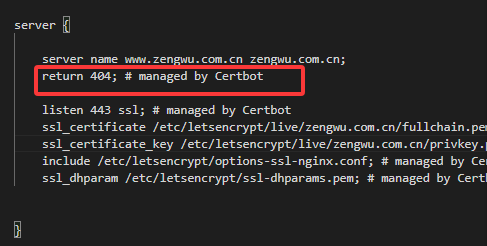
Certbot 配置好 SSL 后,需要编辑生成的配置文件 (通常在 /etc/nginx/sites-enabled/),将 return 404改为proxy_pass 指向您的后端 HTTP 端口。


评论区