
身为程序员习惯用md来写文档,但在一些网站或中间件页面中,添加一些接口说明或文档,可以写Markdown文档再渲染成html到页面。浏览器不能直接渲染 .md 文件,需要借助 Markdown 解析库,这里用 marked + DOMPurify + highlight 来实现。
1. 安装依赖
yarn add marked dompurify highlight.js
- marked:将Markdown 转 HTML;
- DOMPurify:防止 XSS 攻击;
- highlight:代码高亮。
2. 创建 Markdown 渲染组件
import React, { useEffect, useState } from 'react';
import './MarkdownRenderer.css'
import 'highlight.js/styles/atom-one-dark.min.css';
import { marked } from 'marked';
import DOMPurify from 'dompurify';
import hljs from 'highlight.js/lib/core';

// 导入需要的语言
import json from 'highlight.js/lib/languages/json';
import js from 'highlight.js/lib/languages/JavaScript';


interface MarkdownRendererProps {
    content: string; // Markdown 字符串
}

const MarkdownRenderer: React.FC<MarkdownRendererProps> = ({ content }) => {
    const [html, setHtml] = useState("");

    // 注册需要的语言
    hljs.registerLanguage('json', json);
    hljs.registerLanguage('js', js);
    // ...

    // 创建自定义渲染器
    const renderer = new marked.Renderer();

    renderer.code = ({ text, lang }: { text: string; lang?: string }) => {
        // 如果有指定语言且 highlight.js 支持
        if (lang && hljs.getLanguage(lang)) {
            const highlighted = hljs.highlight(text, { language: lang }).value;
            return `<pre><code class="hljs language-${lang}"> ${highlighted}</code></pre>`;
        }
        // 转义普通代码(防止 XSS)
        const escapedText = DOMPurify.sanitize(text, { ALLOWED_TAGS: [] });
        return `<pre><code> ${escapedText}</code></pre>`;
    };

    // 配置 marked
    marked.setOptions({
        renderer: renderer,
        gfm: true,
        breaks: true,
        pedantic: false,
    });


    useEffect(() => {
        const html = marked(content);
        const safeHtml = DOMPurify.sanitize(html.toString()); // 全局清洗防 XSS
        setHtml(safeHtml);
    }, [content]);

    return <div
        className="markdown-body"
        dangerouslySetInnerHTML={{ __html: html }}
    />
};

export default MarkdownRenderer;
3. 编辑CSS样式
这个可以根据自己需求调整,也可以网上找 markd 的样式下载
/* src/styles/markdown.css */
.markdown-body {
  font-size: 14px;
  line-height: 1.1;
  color: rgba(0, 0, 0, 0.85);
  word-wrap: break-word;
}

/* 标题 */
.markdown-body h1,
.markdown-body h2,
.markdown-body h3,
.markdown-body h4,
.markdown-body h5,
.markdown-body h6 {
  margin-top: 24px;
  margin-bottom: 16px;
  font-weight: 600;
  line-height: 1;
}
.markdown-body h1 {
  font-size: 24px;
  border-bottom: 1px solid #e8e8e8;
  padding-bottom: 8px;
}
.markdown-body h2 {
  font-size: 20px;
  border-bottom: 1px solid #e8e8e8;
  padding-bottom: 8px;
}
.markdown-body h3 {
  font-size: 16px;
}
.markdown-body h4 {
  font-size: 14px;
}
.markdown-body h5,
.markdown-body h6 {
  font-size: 12px;
}

/* 段落 & 水平线 */
.markdown-body p,
.markdown-body blockquote,
.markdown-body ul,
.markdown-body ol,
.markdown-body dl,
.markdown-body table,
.markdown-body pre {
  margin-top: 0;
  margin-bottom: 16px;
}
.markdown-body hr {
  height: 1px;
  padding: 0;
  margin: 24px 0;
  background-color: #e8e8e8;
  border: 0;
}

/* 列表 */
.markdown-body ul,
.markdown-body ol {
  padding-left: 2em;
}
.markdown-body ul ul,
.markdown-body ul ol,
.markdown-body ol ol,
.markdown-body ol ul {
  margin-top: 0;
  margin-bottom: 0;
}
.markdown-body li > p {
  margin-top: 16px;
}

/* 引用 */
.markdown-body blockquote {
  padding: 0 1em;
  color: #666;
  border-left: 4px solid #d9d9d9;
}
.markdown-body blockquote > :first-child {
  margin-top: 0;
}
.markdown-body blockquote > :last-child {
  margin-bottom: 0;
}

/* 行内元素 */
.markdown-body code,
.markdown-body kbd,
.markdown-body pre,
.markdown-body samp {
  font-family: 'SFMono-Regular', Consolas, 'Liberation Mono', Menlo, monospace;
  font-size: 12px;
}
.markdown-body code {
  padding: 0.2em 0.4em;
  margin: 0;
  background-color: rgba(150, 150, 150, 0.1);
  border-radius: 6px;
}
.markdown-body pre {
  padding: 16px;
  overflow: auto;
  background-color: #f5f5f5;
  border-radius: 6px;
}
.markdown-body pre code {
  padding: 0;
  margin: 0;
  font-size: 100%;
  background-color: transparent;
  border-radius: 0;
}

/* 链接 */
.markdown-body a {
  color: #1890ff;
  text-decoration: none;
}
.markdown-body a:hover {
  text-decoration: underline;
}

/* 图片 */
.markdown-body img {
  max-width: 100%;
  height: auto;
  background-color: #fff;
  border: 1px solid #d9d9d9;
  border-radius: 6px;
  margin: 8px 0;
}

/* 表格 */
.markdown-body table {
  display: block;
  width: 100%;
  overflow: auto;
  margin: 16px 0;
  border-collapse: collapse;
  border-spacing: 0;
}
.markdown-body table th,
.markdown-body table td {
  padding: 8px 12px;
  border: 1px solid #d9d9d9;
  text-align: left;
}
.markdown-body table tr {
  background-color: #fff;
  border-top: 1px solid #d9d9d9;
}
.markdown-body table tr:nth-child(2n) {
  background-color: #fafafa;
}
.markdown-body table th {
  font-weight: 600;
  background-color: #fafafa;
}

/* 任务列表(可选) */
.markdown-body .task-list-item {
  list-style: none;
}
.markdown-body .task-list-item input[type='checkbox'] {
  margin-right: 4px;
}
4. 在Ant Design 页面中使用
假设 在项目下有md文件 /docs/help.md,在Ant Design 页面添加一个页面
import { Spin } from 'antd';
import MarkdownRenderer from '../../components/MarkdownRenderer';
import { useEffect, useState } from 'react';

const DocsPage = () => {
    const [mdContent, setMdContent] = useState('');
    const [loading, setLoading] = useState(true);

    useEffect(() => {
        fetch('/docs/help.md')
            .then(res => res.text())
            .then(text => {
                setMdContent(text);
                setLoading(false);
            });
    }, []);

    if (loading) return <Spin tip="加载文档中..." />;

    return (
        <MarkdownRenderer content={mdContent} />
    );
};

export default DocsPage;
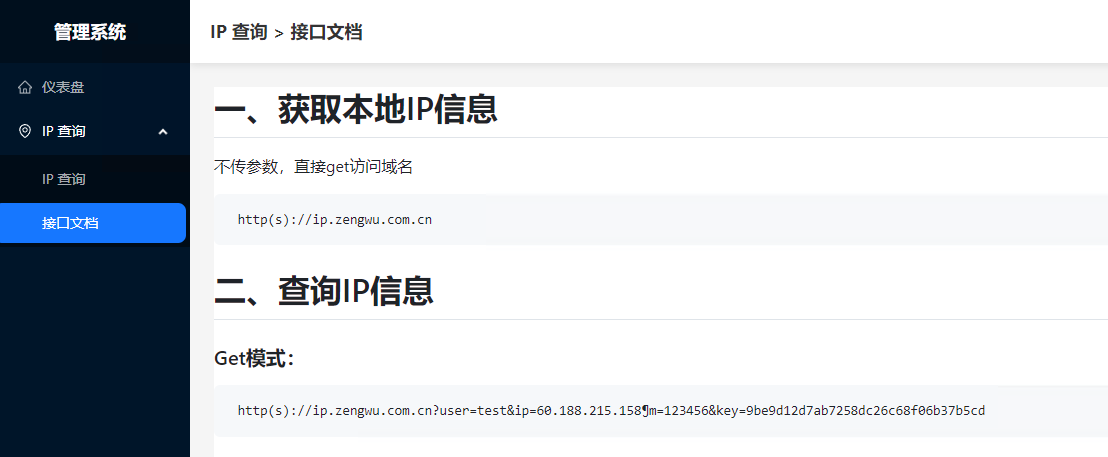
5. 测试效果


评论区