


在pve安装的飞牛中,视频文件夹在pve主机中,通过Proxmox使用Virtio-fs文件共享 共享到飞牛Nas的用户目录中给飞牛视频使用。
经过测试多次测试,发现把挂载写在/etc/fstab文件中导致开机启动时挂载不了,然后就想写一个开机延迟脚本,延迟挂载就好了。
1. 编写挂载脚本
创建挂载脚本 /home/scripts/auto.sh
#!/bin/bash

# 将virtiofs目录video,挂载到1000(管理员)用户目录下的影视目录
mount -t virtiofs video /vol1/1000/影视
赋执行权限
chmod +x /home/scripts/auto.sh
直接执行/home/scripts/auto.sh测试是否挂载成功。
2. 创建 service 文件(无延迟逻辑)
# /etc/systemd/system/delayed-startup.service
[Unit]
Description=Delayed Startup Script
After=local-fs.target network-online.target

[Service]
Type=oneshot
ExecStart=/home/scripts/auto.sh
User=root
3. 创建对应的 timer 文件
# /etc/systemd/system/delayed-startup.timer
[Unit]
Description=Delay startup by 30 seconds after boot

[Timer]
OnBootSec=30s
Unit=delayed-startup.service

[Install]
WantedBy=timers.target
4. 启用 timer(不是 service)
systemctl daemon-reload
systemctl enable --now delayed-startup.timer
5. 重启测试
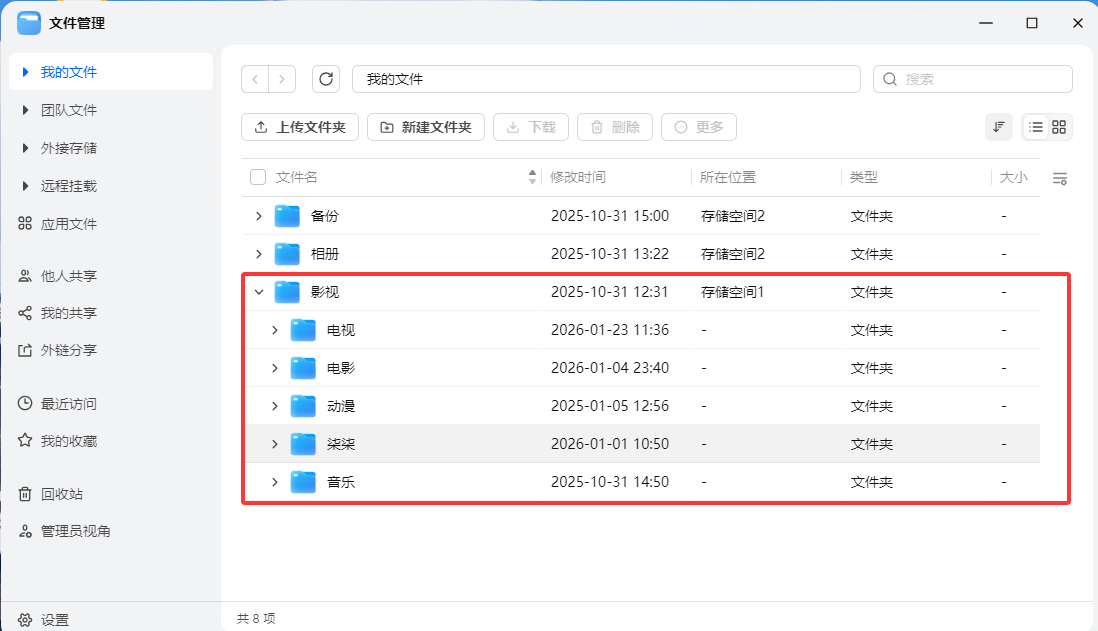
最后重启,进入飞牛管理员用户下,是否有影视目录,目录中的内容是否与pve主机的目录是否一样。


评论区