


在Win11中使用远程连接其他电脑时,每次远程桌面连接都要输入密码,即使保存了凭证,下次依然无效。
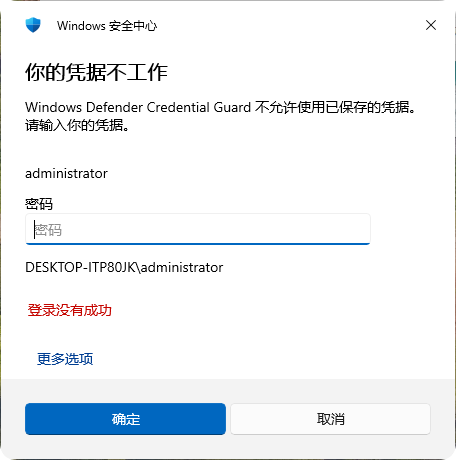
看提示,这通常是因为 Windows Defender Credential Guard(凭据保护) 启用了,它会阻止系统使用已保存的凭据。
解决办法
通过修改注册表,停用Windows Defender Credential Guard(凭据保护)就可以了。
- 在要发启的远程连接电脑上,按
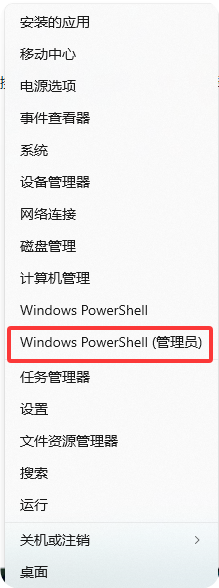
Win + X→ 选择“Windows PowerShell (管理员)”
- 执行禁用命令
# 禁用 Credential Guard 和 Device Guard
reg add "HKLM\SYSTEM\CurrentControlSet\Control\DeviceGuard" /v EnableVirtualizationBasedSecurity /t REG_DWORD /d 0 /f
reg add "HKLM\SYSTEM\CurrentControlSet\Control\DeviceGuard" /v RequirePlatformSecurityFeatures /t REG_DWORD /d 0 /f
reg add "HKLM\SYSTEM\CurrentControlSet\Control\Lsa" /v LsaCfgFlags /t REG_DWORD /d 0 /f
- 删除 UEFI 锁定
reg delete "HKLM\SYSTEM\CurrentControlSet\Control\DeviceGuard\Scenarios\HypervisorEnforcedCodeIntegrity" /f
- 重启验证
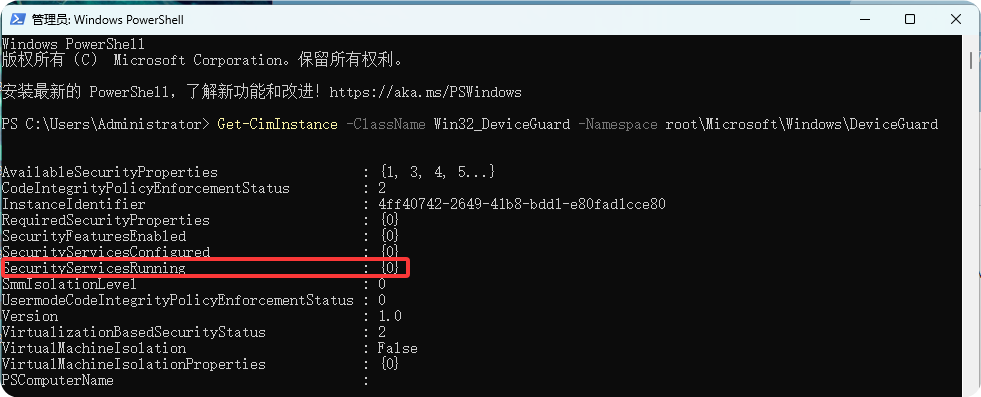
Get-CimInstance -ClassName Win32_DeviceGuard -Namespace root\Microsoft\Windows\DeviceGuard
如果返回中 SecurityServicesRunning 不包含 1,说明 Credential Guard 已关闭。
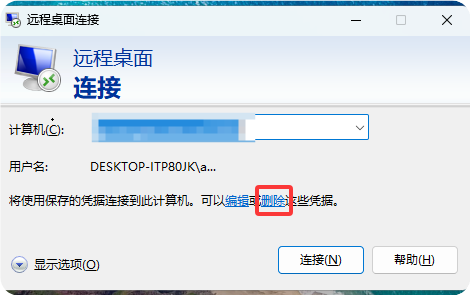
- 进入远程桌面客户端,删除原凭证,重新登录并记住凭证,下次就可以直接登录了。


评论区