


前面讲了使用Cloudflare Tunnels为免费实现内网穿透,连接好后,今天突然发现连不上了,查看Cloudflare后台发现状态为失败
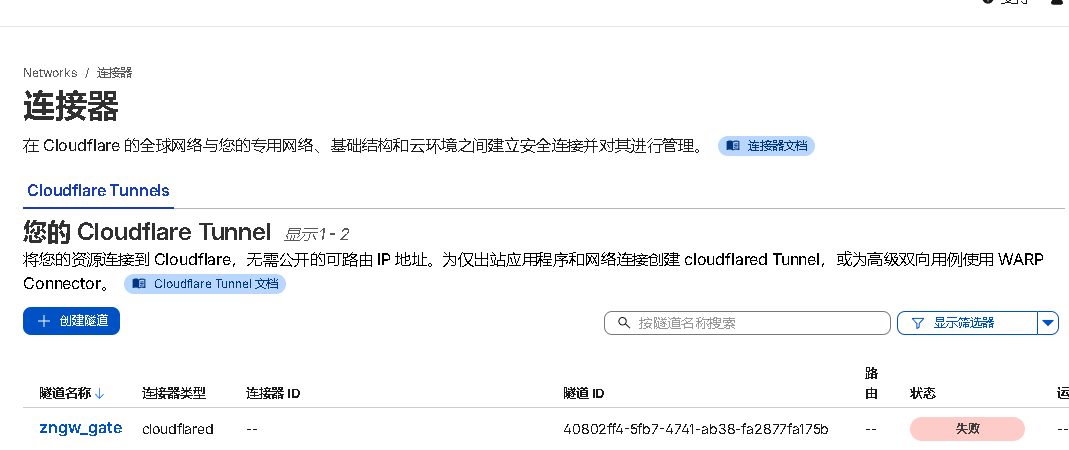
重启服务,查看日志
2026-03-05T12:11:07Z openclaw systemd[1]: Starting cloudflared.service - cloudflared...
2026-03-05T12:11:07Z openclaw cloudflared[512341]: 2026-03-05T12:11:07Z INF Starting tunnel tunnelID=c4d0fa04-31f0-4567-915a-951d59f8684a
2026-03-05T12:11:07Z openclaw cloudflared[512341]: 2026-03-05T12:11:07Z INF Version 2026.2.0 (Checksum 176746db3be7dc7bd48f3dd287c8930a4645ebb6e6700f883fddda5a4c307c16)
2026-03-05T12:11:07Z openclaw cloudflared[512341]: 2026-03-05T12:11:07Z INF GOOS: linux, GOVersion: go1.24.13, GoArch: amd64
2026-03-05T12:11:07Z openclaw cloudflared[512341]: 2026-03-05T12:11:07Z INF Settings: map[no-autoupdate:true token:*****]
2026-03-05T12:11:07Z openclaw cloudflared[512341]: 2026-03-05T12:11:07Z INF cloudflared will not automatically update if installed by a package manager.
2026-03-05T12:11:07Z openclaw cloudflared[512341]: 2026-03-05T12:11:07Z INF Generated Connector ID: 4e49cc78-86bc-4e97-89d3-da65e2a713a4
2026-03-05T12:11:07Z openclaw cloudflared[512341]: 2026-03-05T12:11:07Z INF Initial protocol quic
2026-03-05T12:11:07Z openclaw cloudflared[512341]: 2026-03-05T12:11:07Z INF ICMP proxy will use 192.168.1.161 as source for IPv4
2026-03-05T12:11:07Z openclaw cloudflared[512341]: 2026-03-05T12:11:07Z INF ICMP proxy will use 2409:8a28:14e9:adc0:0000:11ff:fe7f:f5d4 in zone ens18 as source for IPv6
2026-03-05T12:11:07Z openclaw cloudflared[512341]: 2026-03-05T12:11:07Z WRN The user running cloudflared process has a GID (group ID) that is not within ping_group_range. You might need to add that user to a group within that range, or instead update the range to encompass a group the user is already in by modifying /proc/sys/net/ipv4/ping_group_range. Otherwise cloudflared will not be able to ping this network error="Group ID 0 is not between ping group 1 to 0"
2026-03-05T12:11:07Z openclaw cloudflared[512341]: 2026-03-05T12:11:07Z WRN ICMP proxy feature is disabled error="cannot create ICMPv4 proxy: Group ID 0 is not between ping group 1 to 0 nor ICMPv6 proxy: socket: permission denied"
2026-03-05T12:11:07Z openclaw cloudflared[512341]: 2026-03-05T12:11:07Z INF ICMP proxy will use 192.168.1.161 as source for IPv4
2026-03-05T12:11:07Z openclaw cloudflared[512341]: 2026-03-05T12:11:07Z INF ICMP proxy will use 2409:8a28:14e9:adc0:0000:11ff:fe7f:f5d4 in zone ens18 as source for IPv6
2026-03-05T12:11:07Z openclaw cloudflared[512341]: 2026-03-05T12:11:07Z INF Starting metrics server on 127.0.0.1:20241/metrics
2026-03-05T12:11:07Z openclaw cloudflared[512341]: 2026-03-05T12:11:07Z INF Tunnel connection curve preferences: [X25519MLKEM768 CurveP256] connIndex=0 event=0 ip=198.41.192.77
2026-03-05T12:11:15Z openclaw cloudflared[512341]: 2026-03-05T12:11:15Z ERR failed to accept incoming stream requests error="failed to accept QUIC stream: timeout: no recent network activity" connIndex=0 event=0 ip=198.41.192.77
2026-03-05T12:11:15Z openclaw cloudflared[512341]: 2026-03-05T12:11:15Z ERR failed to run the datagram handler error="timeout: no recent network activity" connIndex=0 event=0 ip=198.41.192.77
2026-03-05T12:11:15Z openclaw cloudflared[512341]: 2026-03-05T12:11:15Z ERR failed to serve tunnel connection error="control stream encountered a failure while serving" connIndex=0 event=0 ip=198.41.192.77
2026-03-05T12:11:15Z openclaw cloudflared[512341]: 2026-03-05T12:11:15Z ERR Serve tunnel error error="control stream encountered a failure while serving" connIndex=0 event=0 ip=198.41.192.77
2026-03-05T12:11:15Z openclaw cloudflared[512341]: 2026-03-05T12:11:15Z INF Retrying connection in up to 2s connIndex=0 event=0 ip=198.41.192.77
2026-03-05T12:11:17Z openclaw cloudflared[512341]: 2026-03-05T12:11:17Z INF Tunnel connection curve preferences: [X25519MLKEM768 CurveP256] connIndex=0 event=0 ip=198.41.192.77
2026-03-05T12:11:22Z openclaw cloudflared[512341]: 2026-03-05T12:11:22Z ERR Failed to dial a quic connection error="failed to dial to edge with quic: timeout: no recent network activity" connIndex=0 event=0 ip=198.41.192.77
2026-03-05T12:11:22Z openclaw cloudflared[512341]: 2026-03-05T12:11:22Z INF Retrying connection in up to 4s connIndex=0 event=0 ip=198.41.192.77
2026-03-05T12:11:22Z openclaw systemd[1]: cloudflared.service: start operation timed out. Terminating.
2026-03-05T12:11:22Z openclaw cloudflared[512341]: 2026-03-05T12:11:22Z INF Initiating graceful shutdown due to signal terminated ...
2026-03-05T12:11:22Z openclaw cloudflared[512341]: 2026-03-05T12:11:22Z INF Tunnel server stopped
2026-03-05T12:11:22Z openclaw cloudflared[512341]: 2026-03-05T12:11:22Z INF Metrics server stopped
2026-03-05T12:11:22Z openclaw systemd[1]: cloudflared.service: Failed with result 'timeout'.
2026-03-05T12:11:22Z openclaw systemd[1]: Failed to start cloudflared.service - cloudflared.
分析
- Systemd 的默认行为:当你运行
systemctl start时,Systemd 默认认为服务应该在几秒内(通常是 90 秒,但有时更短)完成启动并进入“就绪”状态。如果服务进程一直运行在前台且没有发送“就绪”信号,Systemd 可能会判定为启动超时并强制杀死进程。 - Cloudflared 的行为:从日志看,
cloudflared成功启动了(Starting tunnel...),建立了连接(Tunnel connection curve preferences...),但它是一个长期运行的守护进程。它并没有在连接建立后立即退出或发送特定的“就绪”通知给 Systemd,而是继续运行。 - 关键错误:
ERR failed to accept incoming stream requests ... timeout: no recent network activity:这通常是因为 QUIC 协议在某些网络环境下(特别是 UDP 被限制或 NAT 类型严格时)握手慢或不稳定。估计家里网最近QUIC的UDP不稳定导致的。systemd[1]: cloudflared.service: start operation timed out. Terminating.:Systemd 等不及了,直接杀死了进程。
查看systemd配置
cat /etc/systemd/system/cloudflared.service

[Unit]
Description=cloudflared
After=network-online.target
Wants=network-online.target

[Service]
cat /etc/systemd/system/cloudflared.service

[Unit]
Description=cloudflared
After=network-online.target
Wants=network-online.target

[Service]
TimeoutStartSec=15
Type=notify
ExecStart=/usr/bin/cloudflared --no-autoupdate tunnel run --token <token>
Restart=on-failure
RestartSec=5s

[Install]
WantedBy=multi-user.target

[Install]
WantedBy=multi-user.target
这里配置15秒,没收到“就绪”信号就把它给kill了,然后又重启,再循环。
解决办法
直接将超时的15秒改为
[Service]
TimeoutStartSec=infinity
改完之后,启动时会要等很长时间才能启动完成。看日志是等待QUIC连接失败,再回退到http2的TCP,再等到连接成功,返回“就绪”信息。


评论区