


一、前提
在用OpenClaw,有电脑的时候还是喜欢用WebUI来操作。我的配置是在内网192.168.1.161虚拟机上运行OpenClaw,然后通过内网另一台Ubuntu服务器做网关使用Nginx转发来访问OpenClaw,虽然Nginx用的是HTTPS,但网关和OpenClaw之间用的是HTTP协议,不想配置太多的证书,而且现在证书时间越来越短了。
"gateway": {
    "port": 18789,
    "mode": "local",
    "bind": "lan",
    "controlUi": {
      "enabled": true,
      "allowInsecureAuth": true
    },
    其他配置
}
之前好好的,前二天更新到OpenClaw 2026.2.19版本,然后运行openclaw status时,报出了一个严重的安全警告。
[openclaw] Failed to start CLI: Error: SECURITY ERROR: Gateway URL "ws://192.168.1.161:18789" uses plaintext ws:// to a non-loopback address.
Both credentials and chat data would be exposed to network interception.
Source: local lan 192.168.1.161
Config: /root/.openclaw/openclaw.json
Fix: Use wss:// for the gateway URL, or connect via SSH tunnel to localhost.
    at buildGatewayConnectionDetails (file:///usr/lib/node_modules/openclaw/dist/call-DZzTR0NL.js:312:40)
    at file:///usr/lib/node_modules/openclaw/dist/status-CuCaWzfB.js:1537:29
    at async withProgress (file:///usr/lib/node_modules/openclaw/dist/progress-Clpi3Ckj.js:116:10)
    at async scanStatus (file:///usr/lib/node_modules/openclaw/dist/status-CuCaWzfB.js:1509:9)
    at async statusCommand (file:///usr/lib/node_modules/openclaw/dist/status-CuCaWzfB.js:1622:249)
    at async Object.run (file:///usr/lib/node_modules/openclaw/dist/run-main-ymxgIjRa.js:139:3)
    at async runCli (file:///usr/lib/node_modules/openclaw/dist/run-main-ymxgIjRa.js:377:6)
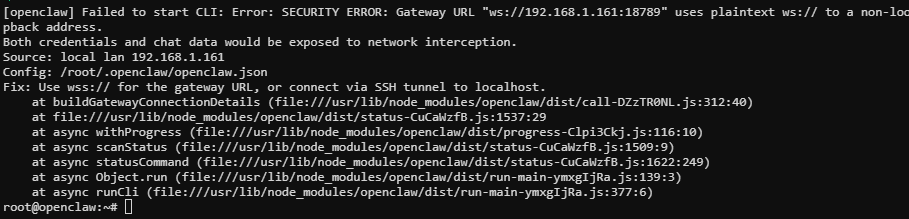
在解决这个问题有二个办法,第一给OpenClaw gateway配置SSL,第二就是用SSH隧道访问。
二、用SSH隧道访问
-
修改OpenClaw配置为
gateway.bind改为 "loopback" -
在网关服务器上生成专用密钥对
# 使用ed25519算法创建密钥对 ssh-keygen -t ed25519 -f ~/.ssh/openclaw-tunnel -C "openclaw-tunnel-key" -N "" # 查看公钥 cat ~/.ssh/openclaw-tunnel.pub -
在OpenClaw服务器上创建专用最小权限用户
openclaw-tunnel# -r 创建系统用户,-s /bin/false 禁止交互式登录, -m 有home目录 sudo useradd -r -s /bin/false -m openclaw-tunnel # 创建.ssh 目录并设置权限 sudo mkdir -p /home/openclaw-tunnel/.ssh sudo chmod 700 /home/openclaw-tunnel/.ssh sudo chown openclaw-tunnel:openclaw-tunnel /home/openclaw-tunnel/.ssh # 创建公钥并限制权限 tee /home/openclaw-tunnel/.ssh/authorized_keys <<-'EOF' no-pty,no-agent-forwarding,no-X11-forwarding,no-user-rc,permitopen="127.0.0.1:18789" ssh-ed25519 AAAA... 前面生成的公钥 ... openclaw-tunnel-key EOF # 设置authorized_keys文件权限 sudo chmod 600 /home/openclaw-tunnel/.ssh/authorized_keys sudo chown openclaw-tunnel:openclaw-tunnel /home/openclaw-tunnel/.ssh/authorized_keys -
在网关服务器上设置密钥文件权限
chmod 600 ~/.ssh/openclaw-tunnel chmod 644 ~/.ssh/openclaw-tunnel.pub -
在网关服务器上测试
# 测试隧道连接,另启ssh,在网关服务器上输入 `curl http://127.0.0.1:18789` 正常能输出OpenClaw页面 ssh -i ~/.ssh/openclaw-tunnel -N -L 18789:127.0.0.1:18789 openclaw-tunnel@192.168.1.161 # 测试普通登录(应该被拒绝) ssh -i ~/.ssh/openclaw-tunnel openclaw-tunnel@192.168.1.161 -
在网关服务器配置开机启动和自动重连,添加
/etc/systemd/system/openclaw-tunnel.service服务文件[Unit] Description=OpenClaw SSH Tunnel After=network-online.target Wants=network-online.target [Service] Type=simple ExecStart=/usr/bin/ssh -i /root/.ssh/openclaw-tunnel -o StrictHostKeyChecking=accept-new -o ServerAliveInterval=60 -o ServerAliveCountMax=3 -N -L 18789:127.0.0.1:18789 openclaw-tunnel@192.168.1.161 Restart=always RestartSec=10 User=root [Install] WantedBy=multi-user.target -
在网关服务器上设置开机启动
sudo systemctl daemon-reload sudo systemctl enable openclaw-tunnel.service sudo systemctl start openclaw-tunnel.service sudo systemctl status openclaw-tunnel.service -
修改网关服务器Nginx中配置,转发地址改成
127.0.0.1:18789location / { proxy_pass http://127.0.0.1:18789; proxy_set_header Host $host; proxy_set_header X-Real-IP $remote_addr; proxy_set_header X-Forwarded-For $proxy_add_x_forwarded_for; proxy_set_header REMOTE-HOST $remote_addr; proxy_set_header Upgrade $http_upgrade; proxy_set_header Connection $http_connection; proxy_set_header X-Forwarded-Proto $scheme; proxy_set_header X-Forwarded-Port $server_port; proxy_http_version 1.1; }


评论区